
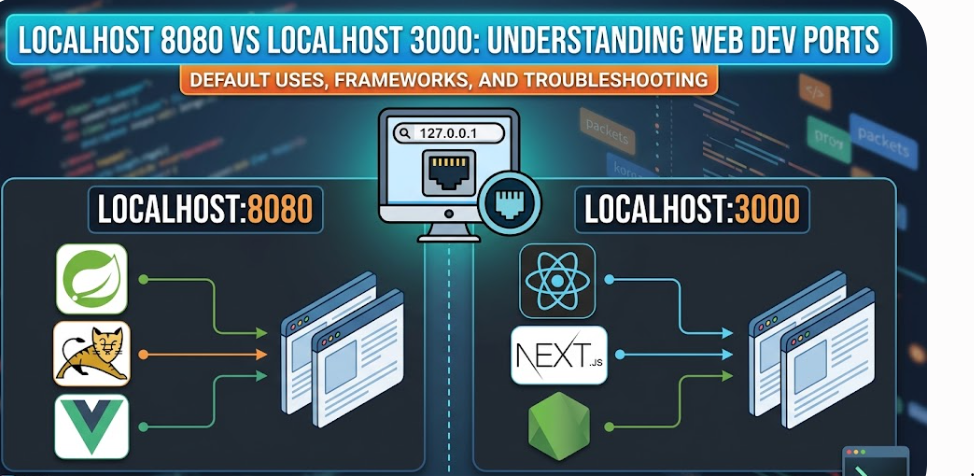
In web development, localhost is the default hostname representing your local computer (loopback IP address 127.0.0.1), while the numbers following the colon—such as 8080 and 3000—are TCP network ports used to route internal network traffic to specific running applications. Because standard HTTP traffic defaults to port 80 (which requires administrator/root system privileges on Linux and macOS), modern web frameworks and development servers assign non-privileged alternative ports above 1024. This prevents port conflicts and allows developers to run backend APIs, frontend interfaces, and containerized microservices simultaneously on a single machine.
What Is Localhost and How Do Ports Work?
To debug local server environments effectively, it helps to understand the underlying networking architecture:
- The Loopback Interface (
127.0.0.1&::1):localhostmaps to IPv4127.0.0.1and IPv6::1. Requests sent tolocalhoststay entirely within your operating system’s network stack and never hit external hardware interfaces. - Network Ports as Virtual Gates: If an IP address functions like a building’s street address, a port is the specific apartment number. Ports isolate individual software processes so they do not intercept each other’s data streams.
- Privileged vs. Unprivileged Ports: Ports
0–1023are system-reserved (e.g., HTTP80, HTTPS443, SSH22). Standard user accounts cannot bind to these withoutsudoaccess, which is why local tooling defaults to high-numbered ports like8080or3000.
Deep Dive: Localhost 8080
Port 8080 is officially designated in IANA’s port registry as http-alt (alternate HTTP). It is the historical industry standard for Java application servers, enterprise web applications, and backend proxy services.
Primary Ecosystems & Defaults:
- Java Application Servers: Apache Tomcat, Spring Boot (via embedded Tomcat), Jetty, and GlassFish default to port
8080. - DevOps & CI/CD Automation: Jenkins, Nexus Repository Manager, and GitLab runners frequently run local web controllers on
8080. - Frontend Tooling & Self-Hosted Apps: Legacy Vue CLI setups, Webpack Dev Server, Open WebUI, and Code-Server use
8080as their default web socket target. - Docker Port Forwarding: Developers standardly map external host port
8080to containerized internal web servers (-p 8080:80).
Deep Dive: Localhost 3000
Port 3000 is the modern standard across JavaScript ecosystems, full-stack frameworks, and server-side runtime setups.
Primary Ecosystems & Defaults:
- Node.js & Express.js: Node servers traditionally default to
const PORT = process.env.PORT || 3000;. - React Ecosystem: Create React App (
npm start) automatically launches development builds onhttp://localhost:3000/. - Next.js & Remix: Full-stack JavaScript/TypeScript applications initialize
next devnatively on port3000. - Ruby on Rails & Analytics: Non-JS platforms like Rails and monitoring tools such as Grafana also use
3000as a default.
Technical Comparison: Localhost 8080 vs Localhost 3000
| Core Feature / Parameter | Localhost 8080 (http-alt) | Localhost 3000 |
| IANA Registration | Registered as Official Alternate HTTP (http-alt) | Unregistered / Vendor-Specific Default |
| Primary Languages | Java, Go, Python, C# / Enterprise Backends | JavaScript, TypeScript, Ruby, Node.js |
| Common Frameworks | Spring Boot, Tomcat, Vue CLI, Jenkins, Docker | React, Next.js, Express.js, Ruby on Rails |
| Architectural Role | Enterprise Backends, Microservices, Reverse Proxies | Modern Client Frontends & Full-Stack Node Runtimes |
| Fall-Through Port | 8081 through 8089 | 3001 through 3005 |
How to Share Localhost (8080 or 3000) with Public URLs
When testing webhooks, debugging on mobile devices, or presenting work-in-progress builds to clients, local loopback addresses (127.0.0.1) cannot be accessed over the public internet. Developers use secure SSH tunneling tools like Pinggy to expose local ports safely.
1. Exposing Localhost via Terminal (No App Installation Required):
Run the following native SSH command in Terminal or Command Prompt:
Bash
# Expose localhost:8080 to a secure HTTPS URL
ssh -p 443 -R0:localhost:8080 free.pinggy.io

# Expose localhost:3000 to a secure HTTPS URL
ssh -p 443 -R0:localhost:3000 free.pinggy.io
2. Inspecting Live Traffic (Web Debugger):
You can launch a real-time HTTP request/response inspector alongside your tunnel:
Bash
ssh -p 443 -R0:localhost:3000 -L4300:localhost:4300 free.pinggy.io
Accessing http://localhost:4300 opens a web console detailing headers, payload data, and bandwidth analytics.
Troubleshooting Common Local Server Errors
1. Error: EADDRINUSE (Address Already in Use)
This occurs when two separate programs try to bind to the same network port simultaneously.
- Fix on Windows (PowerShell / Command Prompt):DOS
netstat -ano | findstr :8080 taskkill /PID <PROCESS_ID> /F - Fix on Linux / macOS:Bash
sudo lsof -iTCP:8080 -sTCP:LISTEN sudo kill -9 <PID> # Alternatively, use npx: npx kill-port 8080
2. Error: ERR_CONNECTION_REFUSED
The browser is asking for a server response on a port where no active process is listening.
- Fix: Check your terminal to ensure
npm run devor your Java server process has started without build compilation errors.
3. CORS Blocks Across Different Ports
If a React frontend at http://localhost:3000 makes an API fetch call to a backend at http://localhost:8080, browsers throw a Cross-Origin Resource Sharing (CORS) security violation because ports differ.
- Fix: Configure backend CORS headers (
Access-Control-Allow-Origin: http://localhost:3000) or configure a local proxy setting in your client framework configuration file.
Configuring Custom Ports in Frameworks
If 8080 or 3000 is blocked by another background process, rebind your application:
- Next.js (
package.json):JSON"scripts": { "dev": "next dev -p 8080" } - React (
.envfile):Code snippetPORT=8080 - Spring Boot (
application.properties):Propertiesserver.port=3000 - Vite (
vite.config.js):JavaScriptexport default { server: { port: 3000 } }
Understanding how localhost:8080 and localhost:3000 handle local network requests enables cleaner project architecture, smoother full-stack integration, and faster troubleshooting during software development.
Leave a Reply