

A YouTube backlink generator is a free tool that submits your video URL to a network of directories, bookmarking sites, and web pages, creating multiple links that point back to your video. The honest way to describe what this does: it helps your video get discovered and crawled outside of YouTube, mainly through Google Search and referral traffic. It does not directly influence YouTube’s own internal ranking algorithm — that part runs almost entirely on watch time, retention, and engagement, not backlinks.
This guide is written against Google’s official Search Essentials guidelines and YouTube’s own creator-facing ranking documentation, so the claims below match what the platforms themselves say — not guesswork.
What a YouTube Backlink Generator Really Is
Instead of manually pasting your video link into dozens of directories and forums one at a time, the tool automates the submission for you. You paste your video URL, click generate, and it distributes that link across its list of indexed pages.
Where this actually helps is on the Google Search side, not the YouTube side. When your video URL sits on other crawled web pages, Google’s crawlers find it faster and can index it into Google Search results sooner — including the video carousel that sometimes appears on page one. That’s a genuinely useful outcome. But it’s a different thing from “ranking higher inside YouTube,” and the two get confused constantly in SEO content, so it’s worth separating clearly from the start.
Where Backlinks Help — and Where They Don’t
This is the part most articles on this topic get wrong, so let’s be precise about it.
- Google Search discovery — backlinks from crawled, relevant pages can help a video surface in Google’s search results and, occasionally, in the video carousel. This is where backlinks genuinely function the way they do for regular web pages.
- Referral traffic — a link on a forum, blog comment, or resource page can bring in viewers who arrive with real intent, since they clicked because the topic interested them.
- YouTube’s own algorithm — according to YouTube’s own creator guidance and independent analysis of the platform, internal ranking is driven by audience retention, session duration, click-through rate, likes, comments, and shares — not by how many external backlinks a video has. A video with weak retention won’t outrank a strong one just because it has more directory links.
- Link authority — most backlink-generator submissions land on low-authority, nofollow directory pages. These pass little to no real “authority,” so treat them as a discovery aid, not a ranking shortcut.
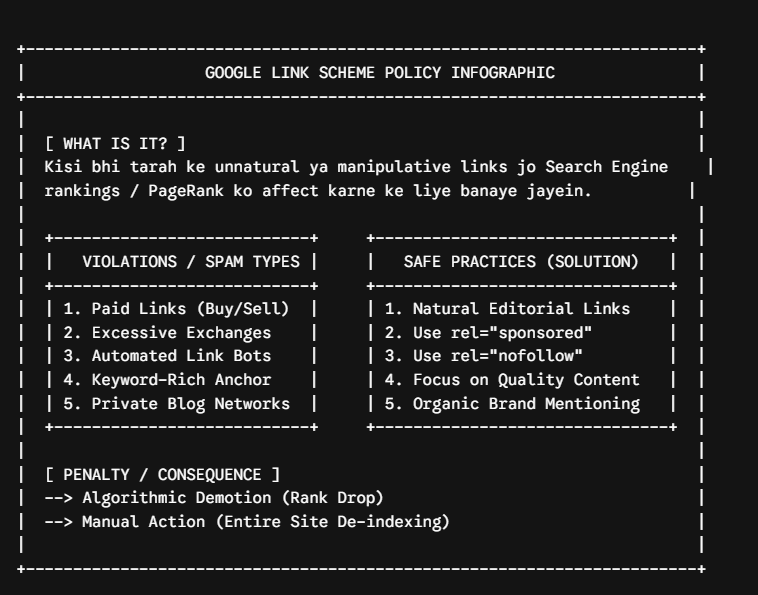
A Word of Caution: Google’s Link Scheme Policy
This part matters and most tools promoting backlink generators skip it entirely. Google’s Search Essentials guidelines explicitly warn against “link schemes” — which includes large volumes of low-quality, automatically generated links created purely to manipulate rankings. Mass-submitting the same URL to dozens of directories in a short burst can fall into that category.
That doesn’t mean using a backlink generator is inherently against the rules — plenty of the directories these tools use are legitimate, low-risk bookmarking or listing sites. But it does mean:
- Don’t run the same video through a generator repeatedly in one sitting, hoping more is always better.
- Treat the links as a discovery and traffic tool, not a ranking manipulation tactic.
- Prioritize a smaller number of relevant, real pages over a large batch of generic directory submissions.
YouTube Backlink Generator vs YouTube Shorts Backlink Generator
These two are related but not interchangeable.
A standard YouTube backlink generator targets long-form video URLs and submits them to general-purpose directories and bookmarking sites.
A YouTube Shorts backlink generator does the same thing but for Shorts URLs specifically, since Shorts are a distinct content format with their own discovery surface (the Shorts shelf) inside the app. The underlying mechanism — link submission for indexing and referral traffic — is the same. The main difference is simply which URL format the tool is built to accept and where those links tend to be placed.
If you publish both formats, don’t try to run one generator for both link types interchangeably — use the tool built for the URL you’re submitting.
Who Actually Benefits From Using One
Not every channel needs this tool, so it’s worth being upfront about who it’s for:
- New channels with little to no external footprint — a channel that exists only on YouTube has nothing pointing to it from the rest of the web; a generator gives it a starting footprint.
- Creators publishing time-sensitive content — news roundups, event coverage, or product launches benefit from faster Google indexing since the topic has a short shelf life.
- Anyone building a secondary discovery channel — someone already doing well on watch time and retention can use backlinks to add a Google Search discovery layer on top of what’s already working.
If a video already struggles with low retention, a backlink generator won’t fix that — the problem lives inside YouTube’s engagement signals, and a generator only affects visibility outside of them.
How to Use a Free YouTube Backlink Generator, Step by Step
- Copy the full video URL from the share button — not just the video ID.
- Paste it into the generator’s input field.
- Click generate/submit and let it process.
- Review the list of pages the link was submitted to — a trustworthy tool shows you this instead of a vague “done” message.
- Give it time. Indexing on Google isn’t instant; it can take anywhere from a few hours to several days depending on how frequently those pages are crawled.
What Actually Moves the Needle for a Video
- A title that says exactly what the video is about, placed naturally, without stuffing keywords.
- A description written for a human first, since a genuine summary carries more semantic relevance than one written purely for search bots.
- Strong opening seconds, since retention in the first 15-30 seconds heavily influences how far YouTube pushes a video afterward.
- Consistency, because a single optimized video rarely outperforms a channel that uploads reliably and builds an audience over time.
Backlinks support this system from the outside. They don’t replace it.
Common Mistakes to Avoid
- Treating backlinks as a ranking hack. They help with discovery, not with beating a competitor’s watch-time numbers.
- Submitting the same URL in rapid bursts. This looks unnatural to crawlers and can trigger the exact spam concerns Google warns about.
- Ignoring retention while chasing links. Traffic that arrives and leaves in five seconds doesn’t help a video’s standing on YouTube itself.
- Assuming every directory link carries equal weight. A link from a topically relevant, real page is worth more than ten from unrelated, low-quality ones.
Frequently Asked Questions
Q: Is a YouTube backlink generator free to use? A: Most legitimate ones are free, with no signup required for basic submissions.
Q: Will backlinks make my video rank higher inside YouTube? A: Not directly. YouTube’s internal ranking runs on watch time, retention, and engagement. Backlinks mainly help with Google Search visibility and referral traffic.
Q: Is using a backlink generator against Google’s rules? A: Not inherently, but mass, repetitive submissions of the same link can resemble the “link schemes” Google’s guidelines caution against. Use it in moderation.
Q: Are Shorts backlinks different from regular video backlinks? A: The mechanism is the same — link submission for discovery and referral traffic — the difference is simply that Shorts generators are built to accept and route Shorts URLs specifically.
Q: How many backlinks should I generate per video? A: There’s no verified “ideal number.” A smaller batch of relevant submissions, spaced out over time, is a safer approach than generating in bulk repeatedly.
Q: What should I use instead if backlinks aren’t fixing my views? A: Look at audience retention graphs in YouTube Studio first. If viewers drop off in the first 15 seconds, that’s a content and hook problem no backlink can solve.
Final Thoughts
A YouTube backlink generator is a genuinely useful, free tool for one specific job: helping your video get discovered outside of YouTube, mainly through Google Search and referral clicks. It’s not a shortcut around YouTube’s own ranking system, and any tool or article claiming otherwise is overselling it. Use it as a supporting piece — alongside a clear title, an honest description, and content that holds attention — rather than the whole strategy.
Ready to try it? Paste your video or Shorts URL into a backlink generator, keep the batch small, and pair it with the on-platform basics above — that combination is what actually moves a video forward.
Leave a Reply